Do you and your kids sit down and write a letter to Santa? What do your kids ask for? And do you fulfill all the things they would like on their Santa letter?
I’ve never sat down and written a letter to Santa until this year. My son is 7 and he is learning to write as well as express his thoughts onto paper. So I think it’s a perfect way to get him to write more if it’s to Dear Old Santa.
I created these Christmas-themed handwriting paper to help him form his letters properly using Canva. It’s such a simple free online design program. I love doing the first handwriting paper so much I created 5 more.
Enjoy writing with your little ones with these papers.
PRINTING AND USES
You can print these Christmas themed handwriting printables on copy paper. It’s that simple. If you have a kid that likes to use markers, I recommend a 32 lb cardstock to prevent bleed through the paper.
There are several ways you can use these Christmas themed handwriting paper.
Use them for journaling.
Writing about all things Christmas related.
Write about favorite Christmas movies or songs.
Write a Letter to Santa.
If your kid is writing a letter to Santa, you can send it to Anchorage, Alaska for an official North Pole postmark.
You must send your letter to the address below by December 7, 2019.
Here is how to do it:
Write a letter from Santa. Fold it and put it in an envelope.
Address the envelope to your child. The return address should say “Santa, North Pole”.
Attached a first-class stamp to the envelope address to your child.
Place that envelope into a larger envelope along with your child’s Dear Santa Letter and address it to:
NORTH POLE POSTMARK
POSTMASTER
4141 POSTMARK DR
ANCHORAGE AK 99530-9998
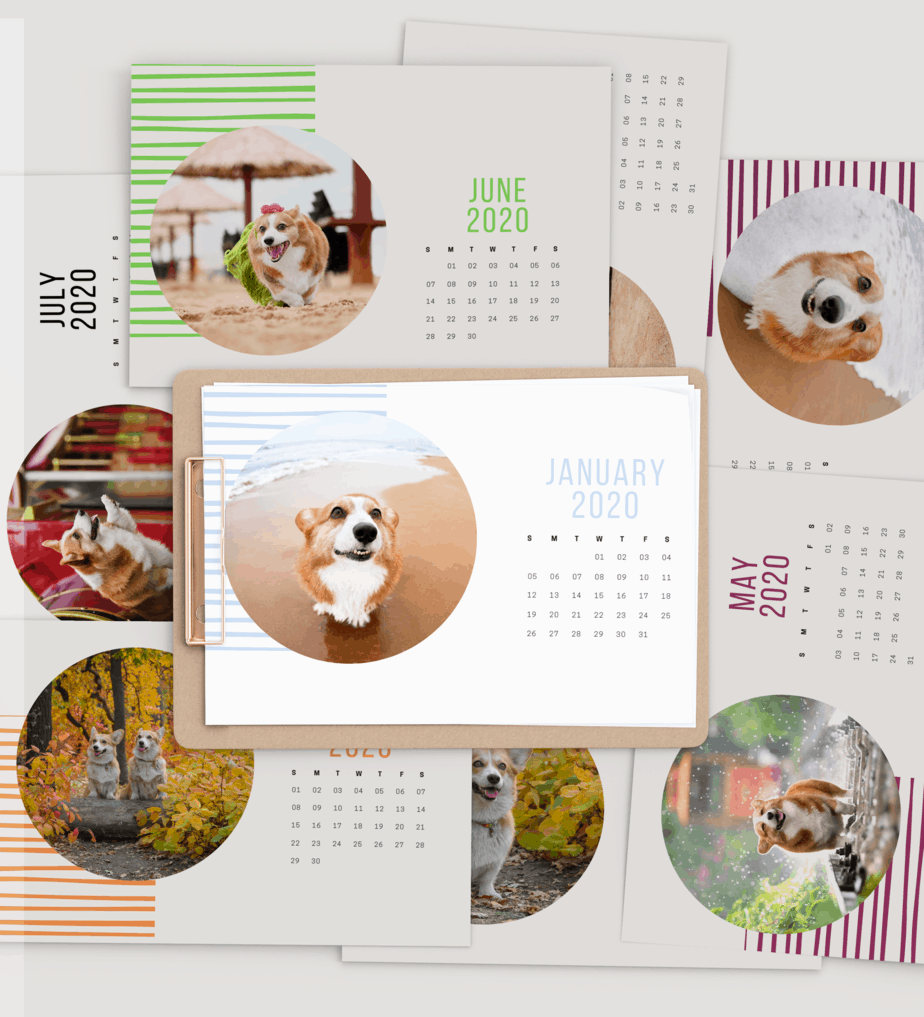
This week’s free 2020 printable calendar is for the Corgi lovers.
If you are in LOVE with Corgis then this calendar will make you smile all day long.
PAPER
You can print these on copy paper, but this Corgi calendar would look their best on cardstock or photo paper. My favorite cardstocks, which you can find at most office supply stores, like Staples. These Neenah bright white cardstock are my favorite for all my paper projects, from posters to party decorations. For a project like this where there are real images, such as these corgis, I like to use photo paper. When printing to photo paper, change your printer setting to photo. This will ensure the most vibrant colors for your corgi calendar.
Thanksgiving is two and a half weeks away and you decided you want to have a Thanksgiving party with your family and friends. You’ve never had one at your place before and you’re not sure where to start.
I’m here to help.
1. Start by thinking about how many people you are going to invite. This will determine the amount of food you need to have to feed everyone you invited. Not sure how much food to have on hand for everyone? Check out this Good House Keeping post for help.
2. What kind of party will it be…yes, a Thanksgiving party. Duh. But do you want it potluck style (where everyone brings a little something)? Or will you cook everything? Cater?
The potluck will ease the burden on you financially and physically (spending less time cooking and more on decorating)
Get the last minute Thanksgiving timeline here to get everything to prepare in time to welcome your guests.
3. Will it be a sit-down party or will everyone be standing around and mingling? This helps with figuring out how many chairs and tables you might need to borrow or rent.
4. Now you are ready for the fun part: Decorating for the party. We will start with the invitation.
INVITATION
It might be too late to send out Thanksgiving invitation in the mail, but it’s not too late to send an electronic invitation.
I’ve created 5 Thanksgiving party invitations that you can easily edit in Canva. It will take you less than 5 mins to put in your party information, download, and attach it to your email.
DOWNLOADING AND ATTACHING INVITATION TO YOUR EMAIL
When you open the templates in Canva, you will see all five + a bonus template. You can delete the templates you don’t want and keep the one you want. Or you can just edit the one you want and select the page that has your invitation to download it to your computer.
Once on your computer, you can attach it to your email.
THANKSGIVING DECORATIONS
For a last-minute Thanksgiving party decoration, you really don’t need much. You can get some cute fall party decorations at your nearest dollar store. Or at the $1 bin at Target. Pumpkins are cute table centerpieces. Here is a beautiful example from Meaningful Mama. You can definitely buy most or all of the supplies for this project at the dollar store.
If you’re a lover of buffalo plaid get this runner for your table. It can be used all year round. Check out how Mariah from Giggles Galore designed her table using a plaid runner.
As for dinnerware, if you’re doing a small gathering use whatever dinnerware you have. To make it more festive you can buy placemats to place it under your plates. You can also print one out. Kristi of I Should be Mopping the Floor always has awesome printables, including this placemat printable. In order to see the words on the placemats, she recommends using clear plates. I love these because they look like real plates with gold trimmings.
I saw these cute thanksgiving plates at my local target and had to have them. Yes, don’t be ashamed to use paper plates for Thanksgiving dinner. You’ll be thankful you don’t have to wash all the dishes after the party.
Welcome your guests to the party with this cute Thanksgiving sign that matches one of the invitations above.
I’ve been so enjoying making my party invitation templates for you. I hope you liked the Halloween party template I created for you.
Today, I’m going to give you these five free dinosaur party invitation templates.
DINOSAUR AND HIS CAKE
It’s so colorful, and you can change the confetti colors to fit your theme. The dinosaur costs $1 if you are using the free version of Canva. That being said, you can do a 30-day Canva Pro trial (affiliate link) and get these and other amazing images for free. Or you can just swap out the dinosaur that I used for a free version. To get free dinosaur clipartS, click on GRAPHICS on the left menu then search for dinosaurs.
If you decide to use this particular dinosaur, Canva will ask you if you want to buy it for $1 before you can download your invitation.
THE FLYING DINOSAUR
THE PINK DINOSAUR
You can change almost all the colors in this invitation, except for the dinosaur since it is not Canva’s graphic.
MARCHING DINOSAURS
You can change the dinosaur color and text. The picture frame can also be changed. To change the frame go to GRAPHICS —> FRAMES–> Pick the frame you like.
ROAR DINOSAUR
PAPER
I have been using these Neena cardstocks for a while now and have loved them. However, I recently decided to try a new brand for comparison and I’m in LOVE. These cardstocks are bright white. I’ve never realized that the Neena cardstocks are actually a warm white color, not a bright white as is stated on their listing. The Accent cardstock is bright white.
DOWNLOADING AND PRINTING THE INVITATION
All 5 dinosaur invitation templates are in one link below. Once you open the template you can do one of two things:
1. Scroll to the invitation template you want and edit it with your information. Then download just the page that has that invitation.
2. Delete all the other invitation by clicking on the garbage pail above each invitation template, leaving only the one you want and editing that one.
If you want to use these templates in the future make a copy of the template first and then edit the new copy.
If you look at my templates all but one has a border. This is to make it easier for you to cut out your cards since the background is white. In my mockup above, I cut inside the border. So you can cut out your cards two ways: with the pink or green borders or without the borders.
Download your invitation as a PDF if you are printing at home. You can also download it as a PNG or JPG if you are sending it out to be printed. I’ve noticed that my invitations are blurry when I download as a PNG or JPG so I’ve only downloaded it as a PDF. Canva also offers printing services for a reasonable price with free shipping. I have not tried it, but I will maybe consider it for Christmas cards.
I recommend using a paper trimmer to cut your invitations. I use this portable paper trimmer. I also have a bigger paper trimmer, similar to this one, to cut 10 cards at a time. It makes it so much quicker to cut out your invitation. And it’s so much easier on your fingers.
This site contains affiliate links.
Shabby Mint Chic Party is a participant in the Amazon Services LLC Associates Program, an affiliate advertising program designed to provide a means for sites to earn advertising fees by advertising and linking to amazon.com
We use cookies to ensure that we give you the best experience on our website. If you continue to use this site we will assume that you are happy with it.OkNoRead more