Make Your Halloween Cupcakes Spook-tacular with These Free Cupcake Topper Printables
The perfect easy and simple food to make for your upcoming Halloween party is spooky cupcakes! All you need are some mixed or standard cake recipes, plus these free printable Halloween cupcake toppers that will give them the spook-tacularly look. And don’t worry about being a great designer – I’ve got everything right here including scary cute decorations on top of each sweet treat so no one can resist eating their way through this collection before they know what’s coming up next…
I created these cupcake toppers 2.25″ so that you can use a 2″ hole puncher. There are 5 designs to choose from. When you download you’ll get 1 pdf file with 6 pages. Each page has 9 cupcake toppers with the same design. The last page has 9 cupcake toppers with all the different designs.
These Halloween designs could also be used as gift tags or stickers to decorate party favors. You can also use these as stickers to decorate a plain white, yellow, orange, or black cup.
Materials
You will need the following supplies if you plan to use them as cupcake toppers.
sticker paper (if you want to use the toppers as stickers on party favor bags)
INSTRUCTIONS ON HOW TO USE THE TOPPERS
Print out your cupcake toppers printable. Use a 2″ hole puncher or scissors to cut out the cupcake topper. Glue or tape the cupcake topper onto the toothpick. Stick a topper into your pretty cupcake.
If used as a gift tag, punch a hole at the top of the topper and tie it to a Halloween gift.
Please share this post by clicking on the social media buttons at the top. Share to Pinterest by clicking on the image below.
Your cupcakes will be the hit of the party with these fun and festive free printable cupcake toppers! With all these different designs to choose from, you can easily create a spook-tacular look that everyone will love. So get your printers warmed up and let’s get started!
Are you throwing a Halloween party this year? These cute Halloween invitations are a great way to invite guests to a spooky good time.
Here are 5 Halloween party invitations that I’ve created for you to edit yourself easily in Canva.
WHAT IS CANVA?
Canva is a free online design program that makes it easy to create beautiful designs without being a graphic designer.
Canva is so easy to use. They have tons of templates. You can use Canva’s many templates, or you can create your own. You can even buy templates created by other designers.
Today I’m sharing with you 5 Halloween party invitation templates created by me using only graphics from Canva. So you don’t need to browse the internet looking for cute graphics for your party needs. Some of the graphics are free, while others cost $1. You can bypass the $1 charge if you do their 30 days trial. Just cancel before your trial ends.
You can create your invitations, cupcake toppers, straw flags, banners, etc. using Canva.
If you’re familiar with Canva, click on the appropriate link under each image and have fun putting in your party invitation.
For Canva newbies, just scroll down the post to watch my Canva tutorial video.
To use the free Halloween party invitation template, you have to click on the “GET HALLOWEEN INVITATION TEMPLATE” under the picture of the invitation you want.
You will then get a page that looks like this.
Click on the “Use template.” This will open up the invitation template.
Now have fun and put in your party information, change the font, font size, font color, add images (they are called elements in Canva), etc. You can even put in the birthday girl/boy photo. I will show you how to add a photo in the last video.
HOW TO EDIT HALLOWEEN INVITATION TEMPLATE VIDEO
Watch the quick 3 mins video below to edit your invitation. Make the video full-screen to better see the options on the left of Canva. Just over the right corner of the video, click on the four arrow icon. That will make it full-screen.
HOW TO CHANGE THE COLOR SCHEME OF YOUR INVITATION
This video shows you how quickly it is to change the colors of the ghost invitation to fit whatever color-scheme you want. You can change everything from the ghosts’ party hats to the background itself.
Note that you can’t always change the colors to all of Canva’s graphics. If you can click on the graphics and the colors show up on the left top corner then you can change the colors.
HOW TO ADD PHOTO TO YOUR INVITATION
To add a photo into your invitation template, go to GRAPHICS then select FRAME. Choose your frame shape. Arrange it on your invitation.
Resize the frame by dragging on the corners of your frame.
Now it’s time to add your photo or image.
Go to UPLOADS.
Click on UPLOAD AN IMAGE.
Locate your photo on your computer then click OPEN.
The photo should now show up in your UPLOADS on Canva.
Drag that photo into the frame. Double-click on the frame to move your photo around.
Congrats. You got a photo on your invitation!!!
With just a few simple steps, you can create your very own invitation to send out to all of your friends and family. And the best part is, it’s totally free! So what are you waiting for? Get started on your Halloween invite today. Have fun with it – make it as spooky or as cute as you want. The choice is yours!
When it comes to throwing a birthday party for your little one, the options can be endless. But if you’re looking for an adorable and unique theme, why not go with a spring panda birthday party? These black-and-white creatures are sure to make any celebration special.
I’ll show you some ideas for parties of all sizes, from banners and tablecloths to favors and decorations. So gather your friends and family together and prepare to have a ton of fun with these spring panda birthday party ideas!
The Birthday Shirt
First and foremost, don’t forget the birthday shirt! A panda birthday party is not complete without one. You can find these shirts online or in stores. They come in all different sizes, so make sure you get one that fits your panda perfectly. If you want to go the extra mile, you can even have a custom shirt made with your panda’s name on it.
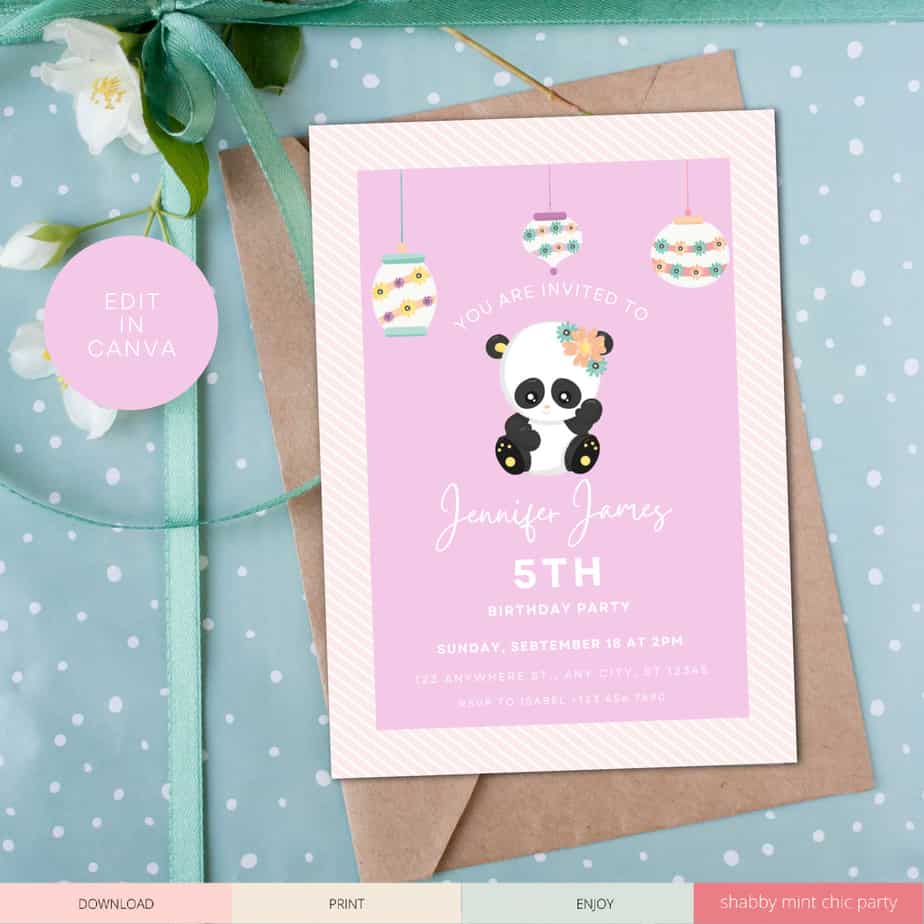
The most important part of the party, besides the party kid, of course, is the panda invitation. This will set the tone for the party. You want something fun and colorful but also includes all the important information like time, date, and location of the party. A great way to do this is to create a custom panda invitation. You can do that with this free spring panda party invitation I’m giving you today.
Click on the image above or here to edit your Spring Panda Invite in Canva.
How to Edit and Save the Invitation in Canva
The free version of Canva is all you need to edit this template. If you don’t have Canva already, you do need to sign up to their Free version. There is no cost, unless you want to use certain features of Canva. You can try out their 30-day trial, play around with it, and cancel before your trial is up.
Edit the Invitation
Editing the invitation is fairly simple. Select the text that is already there and type over it with your own information.
Save the Invitaton
Once you are done editing your invitation, click on DOWNLOAD at the top right corner. Select PDF PRINT from the down menu if you are printing at home. Select JPG or PNG if you are sending it to online photo places that do not take PDF file.
One of the first things guests see when coming to your party is the party decorations, such as a birthday banner or welcome sign.
This spring color panda banner is perfect for your birthday party. You can edit it using Canva, a free online editing program. The file comes with the HAPPY BIRTHDAY! bunting. However, you can easily edit this to say whatever you’d like for your special occasion.
Welcome guest to the party with this cute 8″x10″ party sign.
Panda Party Tableware
The next thing you need to think about is what kind of Panda Party tableware you will use. Panda plates, cups, and napkins such as the one below are sure to cause some pandemonium among your little guests.
Tablecloth
Consider purchasing a tablecloth that you may utilize for another occasion. It’s rather simple to do with a panda-themed party. Purchase a black or white tablecloth and decorate it with additional colorful or panda-related accessories.
Silverware
These panda plates and napkins are too cute for words and will be perfect for your panda birthday party. Plus, they’re disposable so you can easily clean up after the party is over.
Place these palm leaf dishware underneath your panda plates and you’ll have a lovely, more elegant dining set in no time.
Panda food and snacks
Panda Cupcake
These panda cupcakes are sure to be a hit with your guests. If you don’t want to make your own cupcakes, buy some from your local bakery or grocery stores. BJs has good cakes and cupcakes. Turn your plain cupcake into panda theme by placing one of these cupcake toppers on them. You can personalized this as well in Canva.
Watch the video below to see how I edit the Welcome sign, cupcake toppers, thank you tags easily in Canva.
Panda-worthy Activities
You can’t go wrong with a panda pinata at your party. Who doesn’t love getting candy or toys out of a pinata? Plus, it’s a great way to keep the kids entertained.
In addition to the pinata, you can also set up a few other panda-themed activities for your partygoers. A panda coloring station is always a big hit, as well as having some panda stuffed animals around for the kiddos to play with.
If you want to get the kids moving, try this panda bean bag toss game. It’s perfect for both indoor and outdoor parties.
Another fun game is this Pin the nose on the Panda . Simply blindfold your guests and have them try to put the nose on the panda.
You can also set up a panda-themed photo booth.
Panda Party Favors & Gifts
Don’t forget your Spring Panda Birthday party favors! These panda-themed favor bags are perfect for your little guests. Fill them with panda stickers, panda erasers, and other small panda toys. These slap bracelets are super adorable and make for a great panda party favor. This panda keychain is a little pricey, but your guests will love them!
If you are throwing an Adopt a Panda party, I highly suggest getting these pandas.
These white paper gift bags are great for a panda party because your kid can use Panda stickers to decorate the bags. No goodie bag is the same when the birthday boy/girl helped decorate the bag. Use Panda stickers to make it unique to the birthday boy/girl.
If you don’t have time to DIY a gift bag, then try some of these panda-themed gift bags!
Spring Panda Birthday Party Thank You Cards
Don’t forget to send out panda thank you cards after the party! Your guests will appreciate the thoughtful gesture, and you’ll be able to look back on the amazing memories you made together.
Looking for more panda party ideas? Be sure to check out my panda Pinterest board for even more inspiration.
Before you download your freebies, please share this post or save the image below to your Pinterest board.
Start the party off right by inviting guests to your panda-themed birthday party with my free panda party invitation template for Canva.
You can easily edit this 5×7″ party invitation in less than 5 mins- from the time you open the invitation template to downloading it onto your computer.
There are two different designs for you to choose from.
The first file is with “It’s my birthday” inside the banner and “Time to Celebrate” on the template. You just add your party information underneath.
The second template you can edit all the text, add in new text, and even photos. This one could be use for baby shower, birthday, and other social events. You can also just personalize this with your kid’s name in the banner and a cute little quote on the bottom. Print and frame it.
Watch this quick video tutorial to edit your panda invitation template.
This free panda party invitation can be customize using Canva.
Canva is an online design program. There is a free and a paid version. You only need the free version to edit and download this panda invitation.
When you click on my link the the Canva template, a page will open with the template. Simply click on USE TEMPLATE to open it. To edit the text, simply highlight the information that is there and replace it with your own party information. You can change the font, font size, color, spacing between letters and lines, etc when you are editing the text. NOTE: The first template, only the party information can be customized.
Once you are done, click on download button (down arrow on top right corner, right of the SHARE button).
Save as PDF Print if you are printing at home.
Save as PNG if you are sending it to a photo place or sending through email.
Print out these panda cupcake toppers to coordinate with the free panda party invitation.
DOWNLOAD YOUR PARTY INVITATIONS BELOW
PLEASE NOTE: All printables on this blog are for personal use only. Please do not redistribute or sell them. If you would like to share with family and friends, please send them to this post and not directly to the file. Thank you.
This site contains affiliate links.
Shabby Mint Chic Party is a participant in the Amazon Services LLC Associates Program, an affiliate advertising program designed to provide a means for sites to earn advertising fees by advertising and linking to amazon.com
We use cookies to ensure that we give you the best experience on our website. If you continue to use this site we will assume that you are happy with it.OkNoRead more